
 Login >>
When it comes to making your Revity FCU Loan Payment, we like to make it as easy as possible! You can pay your loan in any of the following ways:
- Stop in any branch or use the Night Drop at our Greene or Soabar branches to pay in person
- Transfer money from your Revity FCU savings or checking account to your loan in Online Banking or our Mobile App
- Use MessagePay to pay your loan using a debit card or savings/checking account from another financial institution*
MessagePay
MessagePay is a convenient service that allows you to make a payment on your Revity FCU loan from any outside financial institution via text, online banking/mobile app, or via the MessagePay portal for a $4.99 convenience fee.
Why use MessagePay?
MessagePay gives you a convenient way to pay your Revity FCU loan from an outside account using text messaging, the MessagePay website, and online/mobile banking. Payment information is encrypted and safe so that your information is secure.
What accounts can I use to pay using MessagePay?
You can use a savings, checking, or debit card accounts to pay your bill with MessagePay. All payments are subject to a $4.95 convenience fee.
How do I sign up?
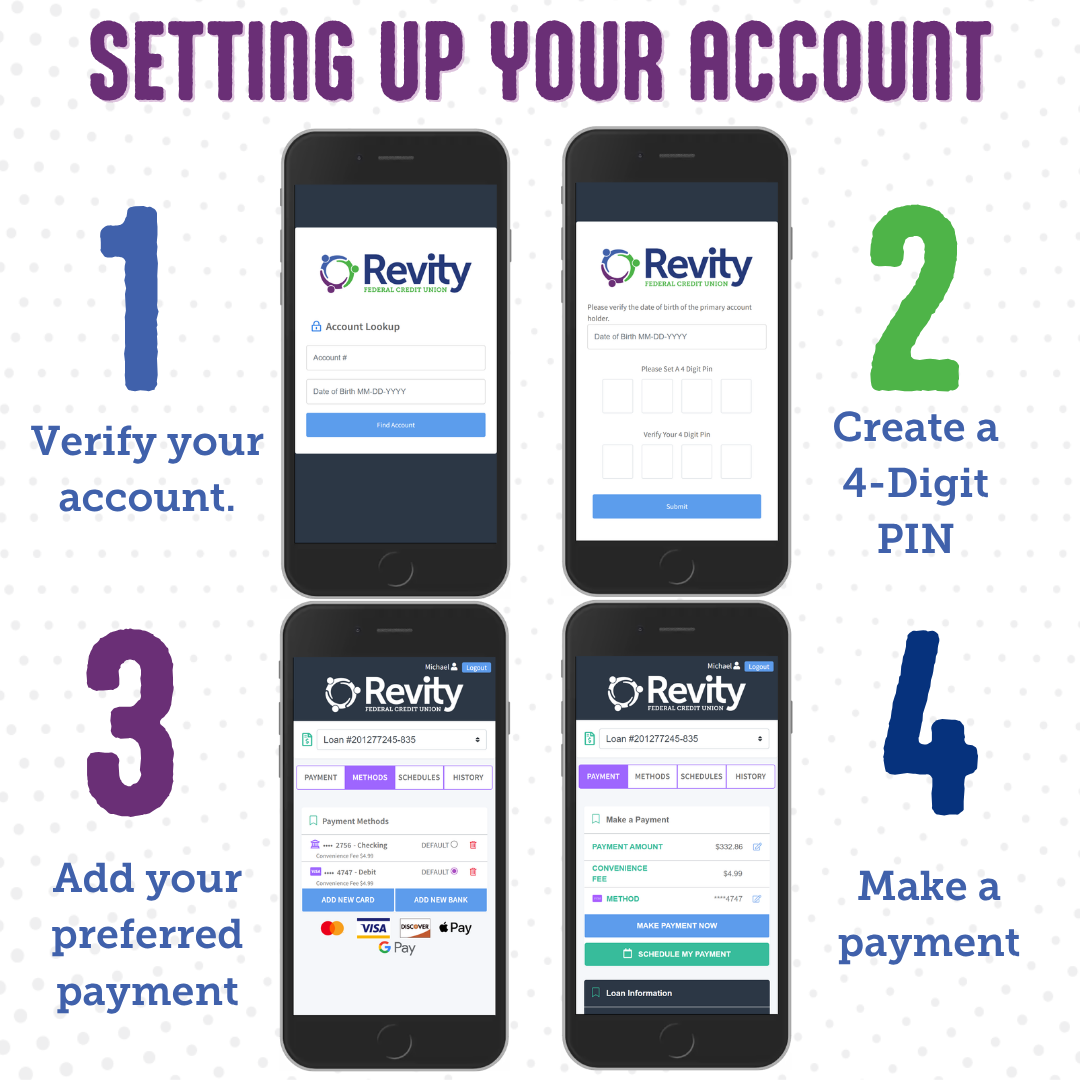
To sign up for MessagePay, visit the MessagePay Portal and complete the following steps:
How do I use the different methods of payment?
After you set up your account, paying is easy:
- Setup Recurring Payments: in the MessagePay Portal, click “Schedule My Payment” and follow the prompts to schedule your recurring payment.
- Text Messaging: once you receive a text reminder, respond “Pay” to the same text. Use your PIN number to verify your account. Payment will come from your preferred payment method.
- MessagePay Portal: login to your MessagePay Portal account, select the loan, and follow the steps.
If you need any assistance, please give us a call at 336-373-2090.

*There is a $4.99 convenience fee for using MessagePay to pay your Revity FCU loan. See Revity FCU for more details.